
Table of contents
- 1. Backup Where
Backup Where
This page specifies where the backup images for the backup set will be stored, and how long to retain them.
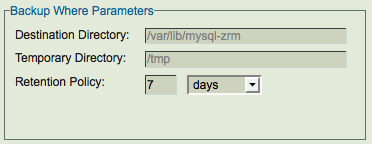
- Destination Directory
- Regardless of where the remote MySQL server is hosted, backups are stored under the backup directory of the local machine where ZMC runs. The default /var/lib/mysql-zrm. If you specify another directory, you must create it yourself on both the ZRM server and the MySQL server, and ensure that its permission settings allow read/write access to the mysql backup user. The directory used on the MySQL server and ZRM server cannot be the same i.e cannot be the same CIFS or NFS share.
- The recommended practice is to mount a filesystem at /var/lib/mysql-zrm. Use local, NFS, or CIFS mounted storage for storing MySQL backup data. The MySQL backup data can be migrated to other storage devices using Network-based backup and recovery utilities such as Amanda. If you are using NFS or CIFS storage as Destination directory, the root user and mysql user should have privileges to read and write to this directory.
- You must allocate sufficient disk space to store the MySQL databases. If sufficient disk space is not available, the backup run will fail. The destination directory should have at least 150% of uncompressed backup space available for a successful backup run. This additional space is required even when backups are configured for compression, since the additional space is used for compression during the backup run. The additional space is freed after the backup run.
- Example: Backup set "daily" requires 150GB of disk space for uncompressed backups and backup image upon compression are 100GB. The backup directory filesystem should have at least 225GB (1.5 * 150GB) for space.
- After backup run is completed, only 100GB of disk space will be used.
- The destination directory must not be under autofs controlled mount point because snapshot based backups mount the file system or storage snapshot under the Destination directory.
- Temporary Directory
- Retention Policy
- A retention policy sets the limit of the period for which the backup set will be retained. Images older than the retention policy specified are automatically purged. The retention policy for a backup image is stored in the backup index at the time of backup. So, changing the retention policy will not change the retention policy of backup runs that have been completed. If the retention policy is not specified, the backup images are retained forever.