
Table of contents
This page describes the environmental requirements you should verify before running the install program. The Amanda Enterprise Edition components required on each are described in /p/span, line 1, column 23: ")" expected.
Throughout this document, The MySQL Server refers the database server being backed up by the Amanda Enterprise Edition Server, which also called the ZRM Server.
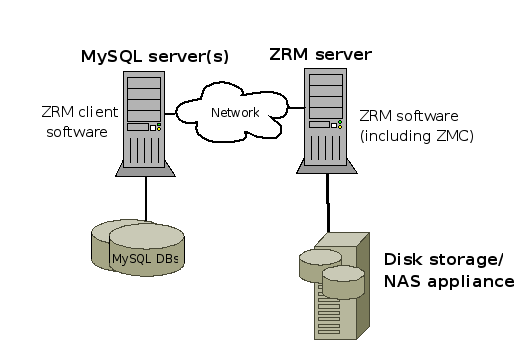
Amanda Enterprise Edition backup server requirements
- To run the Rapid Installer, the ZRM Server requires 256MB of free memory. You should have at least 500MB of disk space, and you should not install the ZMC itself (/opt/zmanda/zrm) on an NFS partition.
- In addition to the space required for the software itself, you should ensure that there is always 10% free in the Zmanda installation and temporary directories. If Amanda Enterprise Edition runs out of space on either of these directories while a backup is in progress, the backup will fail with MySQL errors similar to the following:
System Error
DBD::mysql::db do failed: Incorrect key file for table
'/var/tmp/#sql_24b8_0.MYI'; try to repair it at
/opt/zmanda/zrm/bin/amreport_wrapper line 105.
    8:51:26, Mon Mar 17, 2008:ZMC Database Query failed: mysql query
failed:Incorrect key file for table '/var/tmp/#sql_24b8_0.MYI'; try to repair it
- If you encounter messages like this in the ZMC, try increasing the amount of available disk space in the relevant directories.
- Verify that the ZRM server has operating system accounts for a mysql user belonging to the mysql group. The account should have a login shell, and be able to execute commands on the ZRM server. See the "Creating a MySQL Backup User Account" section below for details.
- The Amanda server and client require that certain communication ports are open:
- The Amanda server must open inbound TCP ports 11000:11040.
- Non-Windows Amanda clients must open inbound TCP port 10080 and outbound TCP ports 11000:11040.
- Windows clients must open inbound TCP ports 10080 and 10081, and outbound TCP ports 700:800.
ZRM Server Package Dependencies
The following packages are required on the ZRM Server (32-bit versions of packages required):
Linux
- Amanda Enterprise Edition requires the MySQL client commands listed below to be installed on the ZRM server. ZRM uses the following MySQL commands on the ZRM server:
- The MySQL client commands installed on the ZRM server must be compatible with the version of MySQL servers being backed up. Zmanda recommends installing the same version of MySQL software on the ZRM server and MySQL server.
- The ZRM server assumes that the MySQL backup client's MySQL commands are installed in /usr/bin/. You can change this default either globally or by backup set. If necessary, you can change the client command location and binary log location in {{web.html($Config_method)}}. See the MySQL subsection of the {{web.html($BS_Config_method)}} for details.
- perl: The Perl-DBI, Perl-DBD-MySQL, and perl-XML-Parser modules are also required. See the Perl installation notes section of the manual.
- mailx: The mailx package can be found as part of the OS distribution. The mailx package must be configured to send mail from the ZRM machine to the MySQL database backup administrator.
- compat-libstdc++-33-3: The GNU C and GNU C++ Compiler runtime libraries
These packages are installed by default on most Linux distributions. If you need to add them, you can use yum or apt-get, either from the distribution media, or from a distribution repository (run either as root):
#yum install package_name
or
#apt-get install package_name
Solaris 10 (Both Sparc and Intel Architectures)
- perl
- mailx: The mailx package can be found as part of the OS distribution. The mailx package must be configured to send mail from the ZRM machine to the MySQL database backup administrator.
- gcc3g++rt: The GNU C++ Compiler runtime libraries
- CSWgcc3corert: The GNU C Compiler runtime libraries
The Zmanda Network downloads page collects all of these packages in a downloadable tar archive (which is made available after you select a platform to download). If necessary, download the tar archive to the local system, extract it, and run pkgadd as the superuser to install it:
# pkgadd -d package_name
Backup client requirements
Package dependencies for Backup Clients
Amanda Enterprise Edition requires the 32-bit versions of all packages.
Linux
- perl: The Perl-DBI, Perl-DBD-MySQL, and perl-XML-Parser modules are also required. See the Perl installation notes section of the manual.
- xinetd
- sudo (required only for snapshot backup configurations)
These programs are installed by default on most Linux distributions. If you need to add them, you can use yum or apt-get to install them, either from the distribution media, or from a distribution repository (you run either as root):
#yum install package_name
or
#apt-get install package_name
Solaris 10 (both Sparc and Intel Architectures)
- perl: The Perl-DBI, Perl-DBD-MySQL, and perl-XML-Parser modules are also required. See the Perl installation notes section of the manual.
- SUNWcsu
- SUNWsshcu
- SUNWgzip
- SMCtar (version 1.15.1 or greater)
- SMCgpgme
- SMCsudo (required only for snapshot backup configurations)
- SMCgrep
- SMCcoreu
The Zmanda Network downloads page collects all of these packages in a downloadable tar archive (which is made available after you select a platform to download). If necessary, download the tar archive to the local system, extract it, and run pkgadd as the superuser to install it:
# pkgadd -d package_name
Windows (2003 Server, XP, and Vista)
Windows clients must open inbound TCP ports 10080 and 10081, and outbound TCP ports 700:800.