
Table of contents
MySQL Configuration Requirements
To take advantage of Network Appliance snapshots, all MySQL data and logs must reside on Network Appliance volumes. The following are some of the possible configurations
- All MySQL data is on a single Network Appliance Volume
- Specific database directories are on different volumes
- For databases containing InnoDB-based tables, the snapshot can only be used if the database directory, the InnoDB data files and the InnoDB logs are all on Network Appliance volumes.
- The InnoDB shared data files are on a separate Network Appliance volume
- The InnoDB logs are on a separate Network Appliance volume
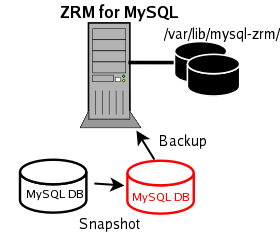
The Network Appliance volumes are mounted on ZRM server using NFS. ZRM user "mysql" should have permissions to read and write to the volumes.
Pre-conditions for Using Network Appliance Snapshots
- The MySQL backup user must be granted sudo privileges to execute Network Appliance commands on the MySQL server. Add a line similar to the following example to /etc/sudoers on the MySQL server:
mysql ZRMserver.mycompany.com Server>=NOPASSWD:/bin/mount,NOPASSWD:/bin/umount,NOPASSWD:/bin/df
- where ZRMserver.mycompany.com is the fully-qualified domain name for the ZRM server. Note that if the Network Appliance commands are installed in non-standard locations, the above example would not work without editing it to reflect the different paths.
- The snap reserve for the Network Appliance volume must be adequate to accommodate changed data. The Network Appliance default of 20% may be low or high for your site, depending on data change rates.
- To determine the snap reserve, use the Network Appliance snap reserve volumename command.
- All MySQL database files (data, log, indexes) must be stored in Network Appliance volumes to ensure consistency.
- If any of the files are not on Network Appliance volumes, a raw backup using mysqlhotcopy, or a logical backup using mysqldump will be taken based on the storage engines of the tables in each of the databases.