
Table of contents
Zmanda Cloud Backup 4.0 is the latest release of Zmanda Cloud Backup product. Early access version of the product is available in Zmanda Network.
Please do not deploy ZCB 4.0 early access release on production systems.
Upgrading from Zmanda Cloud Backup releases
ZCB 3.0.2
- Customers can upgrade to the 4.0 early access release by running the installer executable as shown the next section.
ZCB 3.0.1
- Customers must un-install 3.0.1 software and install the 4.0 early access software by running the installer executable as shown in the next section. During the un-install process, please select yes to preserving configuration and data.
Installation/Upgrade procedure
- Download the Zmanda Cloud Backup 4.0 early access software from Zmanda Network (Zmanda Network credentials are required).
- Please make sure system requirements such as Java 6 Update 16 or later must be installed for non-Windows 7 platform and Java JRE 6 Update 20 for Windows 7 must be installed. You need to install 32bit version if you are using 32bit Windows and 64bit version of Java if you are using 64bit Windows.
- Run the installer .exe file. It will extract the archive contents and run setup.exe automatically.
- If you are running previous version of ZCB, you will prompted about preserving old configuration. Please answer Yes if you would like to use the backup set configuration, reports and restore from old backups.
- The Zmanda Cloud Backup documentation is available in the ZCB UI (Help>Getting Started, Help>FAQ).
- Download Zmanda Cloud Backup Certificate available in the Zmanda Network under Downloads tab. Download the file to the ZCB machine and Import the file into the configuration using ZCB UI (Cloud>Import Cloud Certificate).
Zmanda Cloud Backup will not install on machines running Amanda Enterprise
Windows Client or Zmanda Recovery Manager (ZRM) Windows client.
Product Changes
Zmanda Cloud Backup 4.0 includes significant improvements to usability and reliability. Zmanda 4.0 features are:
Functionality
- Selective backup of MS-SQL and MS Exchange Server
- Differential backup of MS SharePoint
- A new “Backup to cloud” operation, to backup directly to cloud without the need of storing data on the local disk
- Pause/Resume of a “Backup to cloud” operation
- Support for custom Pre-Restore and Post-Restore actions
- Improved retention policies for better data protection
- Support for Amazon S3 – Tokyo Region.
Usability
- A new GUI with many new usability improvements
- One screen, simultaneous monitoring of all backup sets
- Flexible scheduling options
- User friendly email notification functionality
- Parallel backup, restore, validate and estimate operations
Performance
- Significantly faster downloads and uploads (upto 3 times faster)
- Ability to do parallel uploads and downloads within a backup set
Known issues
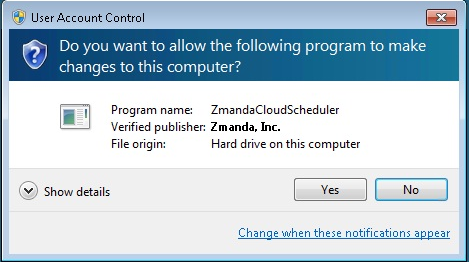
- Windows UAC (User Access Control) in Windows 7 and 2008 Server pop up windows appears when ZCB schedules are added/modified/deleted/read from the UI as shown below. Please click Yes to continue. This happens because ZCB runs with Administrator privileges to interact with Task scheduler.
- When backups are started from ZCB UI (not scheduled backups) and the user logs out, the backup fails. Use backup scheduler to perform backup/uploads.