
Table of contents
The four tabs under the Admin tab perform administration tasks.
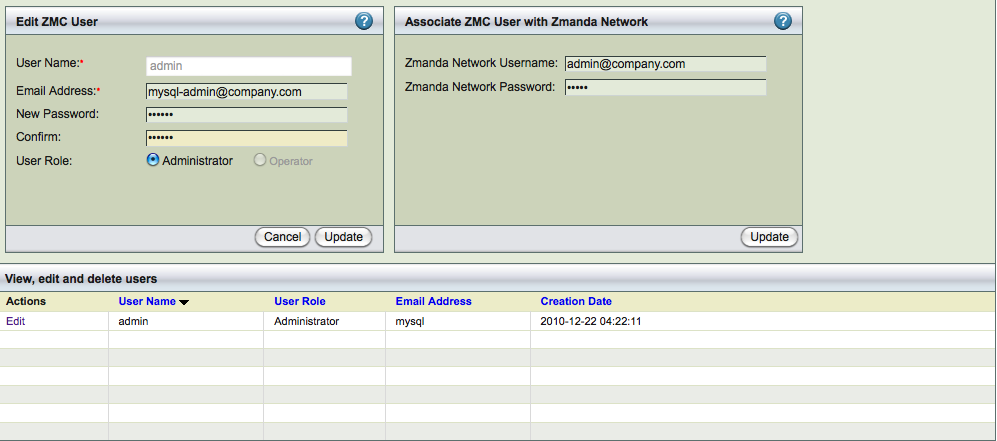
The Admin Users provides a convenient way to create, edit, view and delete ZRM for MySQL users. It also lets you register ZMC users with the Zmanda Network. Please take the time to register users with the Zmanda Network; registration is required for accessing the Zmanda Network Knowledgebase from within the Zmanda Management Console.
Admin Users Page Procedures
The Admin Users page is divided into two panels:
- The left panel allows you to create, edit, view and delete ZMC users..
- The right panel lets you associat the selected ZMC user with an existing account on the Zmanda Network.
User Management
The default username is Admin, with a password of admin. You should change this upon first login.
- User name
- Choose a user name. The name can be any alphanumeric string. Dots (.) and dashes (-) are allowed; spaces are not.
- Email address
- This address will be used if the user's password must be recovered (see the Login page).
- Password
- The ZMC user password. You must enter it twice for confirmation purposes.
- User Role
- ZRM for MySQL implements a Simple RBAC (Role Based Access Control) scheme: A user can either be an operator or an administrator.
An administrator can:
- create backup sets and assign their ownership to anyone in the system.
- edit or delete backup sets owned by any other user in the system.
- see all events and all alerts.
An operator can:
- Create backup sets owned by that operator.
- Edit or delete backup sets owned by that operator.
- See all alerts, but only the events attached to the backup set owned by that operator.
Associate ZMC User with Zmanda network Panel

The right panel allows you to associate the user with an existing account on the Zmanda network.
- Zmanda Network username and password
- These fields lets you associate the ZMC user with an existing Zmanda Network login ID. Enter the username (i.e., the email address) and password that were provided during Zmanda network registration. Click the Add button to validate the Zmanda network login details. If the login credentials are correct (i.e., they match those in the Zmanda Network), the change is updated on the ZMC user list.
Edit / Delete ZMC User

To edit or delete an existing user, click either the Edit or Delete link next to that user. When you click Edit, the contents of the row are displayed in the fields above for editing.
All Users can edit their own password and email address; only users with administrator privileges can edit or delete another user's account.
- Note: There is no warning when deleting a user.
- Please contact [email protected] for procedures to recover a user account if necessary.