
Table of contents
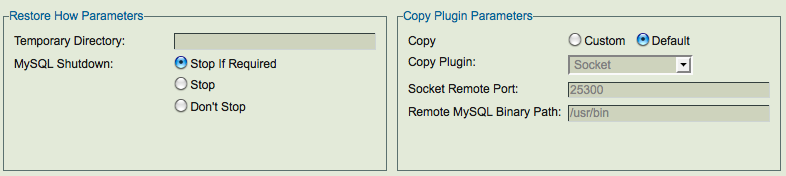
The Restore How lets you set some operational details for the restore. If you have set the global settings appropriately in the Site Settings page, you can just use the default values for the controls on this page.
Restore How Panel

- Temporary Directory
- ZMC creates temporary files and directories during restore. This directory should have sufficient space to hold at least one full backup on the backup host during restore. By default it will use the directory pointed to by the TMPDIR environment variable. If that is not specified, then /tmp is used. Only specify a different directory if you have a specific need to do so.
- MySQL Shutdown Options
- The 'MySQL Shutdown' radio buttons let you specify whether the MySQL server should shut down during the restore process.
The options are:
-
- Stop if required.
- Stop.
- Don't stop.
Copy Plugin Parameters

If performing a restore to a remote MySQL server, specify the mechanism used to transfer files between the local ZMC server and the remote MySQL server. The recommended location for plugins is the /usr/share/mysql-zrm/plugins directory.
- Copy Option
- Lets you select whether to use a Copy Plugin during the restore process. Set the 'Copy' radio button (No. 3 above) to 'Yes' to opt for the Copy plugin. If the 'No' option of Copy is selected then rest of the input boxes in the panel can be ignored.
Copy Plugin Drop down box:
The Copy Plugin drop down box (No.4 above) lets you choose between SSH or Socket.

- SSH
- This plugin uses the Secure Shell protocol to transfer files between the MySQL server and the ZRM server. Since SSH is being used, the data transfer is secure. Unless you have set up SSH keys for the MySQL restore user, you will be prompted for a password when restoring from the backup set.
- SSH User
- Specify the SSH User name.
- Remote MySQL Binary path
- Specify the path on the remote MySQL server under either of the two options.
- Socket
- The socket based plugin is called socket-copy.pl. The socket copy plugin requires MySQL ZRM socket server package to be installed on all MySQL servers. The socket-server package installs xinetd/inetd socket server service and restarts xinetd/inetd.
- The socket copy plugin uses the TCP protocol to transfer data between the MySQL server the ZRM server. It uses port 25300 by default on the MySQL server. You can change the port using the field displayed after you select the socket copy plugin.

- Socket Remote Port
- Enter the port you wish to use.
- Remote MySQL Binary Path
- Specify the path on the remote MySQL server where the MySQL binary commands are installed.
- Windows
- The Windows copy plugin is required for restoring any Windows-based MySQL server. It requires the ZRM for MySQL Windows client components described in the Installation Instructions. You must then enter the communications ports to use during restore (default is 10081) operations, and the retry count.
- The retry count specifies the number of times ZRM will attempt to restore a
raw backup in case shutting down the MySQL server takes more time than expected. Hence ZRM will only attempt to retry for the restore of the very first file that is attempted to be restored. The default value is 2.
Exit Status
If the plugin exit status is 0, the file transfer is considered as successful. Otherwise, it is treated as failure. Copy plugin failure might result in database backup or database restoration failure.
Logs
Errors and Messages from the plugin are logged to mysql-zrm logs ( /var/log/mysql-zrm/mysql-zrm.log )
Next Step Button
Clicking the Next Step button (No. 7 in Fig.1 above) at the bottom takes you to the Run Restore page.