
Table of contents
- 1. Summary Report
- 1.1. Summary Report Page Main Functionality
- 1.2. Date and Legend Panel
- 1.2.1. Selecting a Report Date
- 1.2.2. Calender control
- 1.2.3. Legend
- 1.3. Summary Panel
- 1.3.1. Date Browse Buttons
- 1.3.2. Time Stamp links
- 1.3.3. Contents of Summary Reports
Summary Report
ZRM for MySQL automatically generates backup reports after the backup run is completed (or if it fails for some reason). This backup summary report includes:
- status of the current/last backup run
- the backup type (in other words, whether the backup was a quick (no-copy) snapshot backup.
- backup statistics
- location of the backup image
- backup level.
If the machine where ZMC is running is configured to send mail, reports can be automatically e-mailed after every backup run.
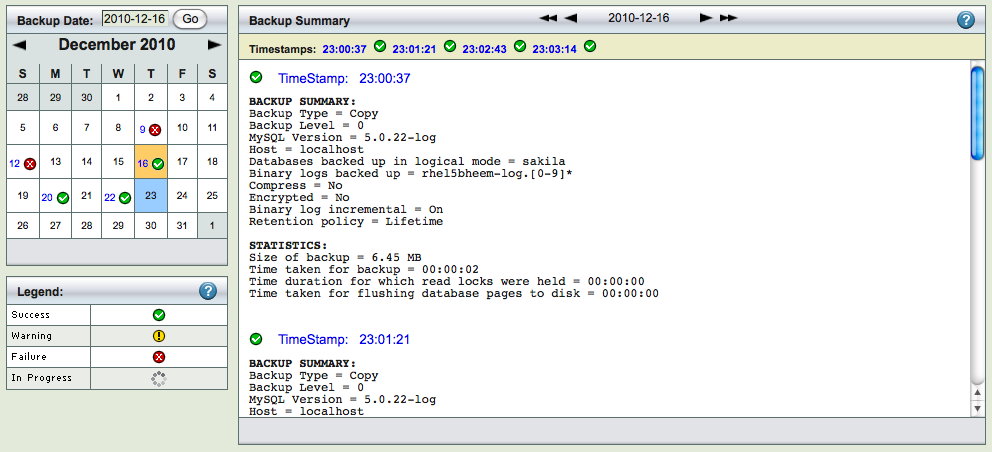
The Summary Report page is divided into two panels.
- The left panel shows a calendar control from which you can select report dates, and a legend that explains the report icons.
- The right panel displays the report for date selected on the calendar.
You can select reports using any of the following:
- Browse buttons at the top of the report itself.
- You can enter a date on the left panel and click the Go button.
- You can pick a date off the calendar.
All of these methods are described below.
Summary Report Page Main Functionality
The Summary Report page displays the progress and final status of previous backup runs of a given backup set.
Date and Legend Panel

The Summary Report page opens with the calendar set to the current month.
Selecting a Report Date

You can either enter the date (mm/dd/yy[yy]) and click Go, or click on any icon in the calendar. When you click Go (or click on a different date), the report shows any summary data (if any is available) for that date.
Calender control
The calendar control offers a graphical way to choose a report date. Dates that include backup data have a status icon; click the icon to display the given report (you cannot select dates with no backups to report on).

When you click a report icon, it changes color to show it has been visited:

The example above shows 5th July as having been selected and visited.
Legend

Legend shows four possible status for a backup run:
- Error
- Requires immediate attention
- Warning
- A recoverable failure
- Success
- Successful backup run, the data backed up can be recovered from this image
- Progress
- Backup run is in progress. Please check Monitor page for more information about this backup run
Summary Panel

The Report Summary panel on the right has the following navigational aids:
Date Browse Buttons

The date browse buttons allow to conveniently move back and forth one day (using < or >) or one week (using << or >>) at a time.
Time Stamp links

Timestamp links below the browse buttons show the time at which the backup run was initiated. Clicking on a Timestamp link go to the Restore What page with the date and time automatically filled in.
- Note
- Similar links to the Restore What page are featured in predefined reports for successful backup runs. They are also included in the Database Events page.
Contents of Summary Reports

The Summary Report contains summary under the following heads:
- Backup Summary
- The what, when, where and how of the backup run. Note that Backup Type indicates whether the backup is a standard backup copied to the ZRM server (Copy), a quick snapshot backup (No-copy), or a quick snapshot that has been converted to a standard backup (Copy (converted)).
- Statistics
- How much data was backed up and how long it took. Note that quick snapshot (No-copy) backups always display a backup size of zero, because no data transfer occurs when this type of backup is run.