
Table of contents
- 1. Backup When
Backup When
This ZMC page allows users to schedule backup runs for the backup set. Users can add a schedule a new backup run (Add Schedule), modify an existing scheduled run (Modify Schedule) and delete an existing scheduled run (Delete Schedule).
ZRM uses operating system crontab tool to implement this functionality.
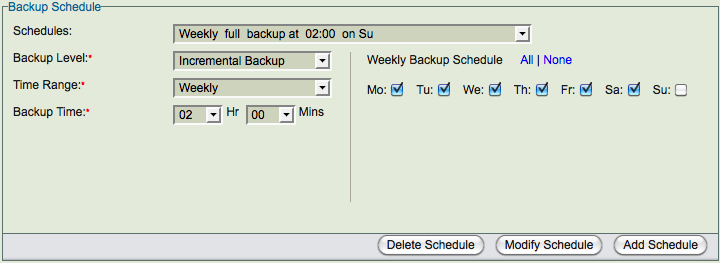
The figure below shows a backup schedule that is being created. There is a weekly full backup scheduled at 2am (local time on the ZRM server) on Sundays. A Log incremental backup is being added on other days at 2am.
Schedules
List of schedules that have been configured for the backup set. If there are no scheduled backup runs, Add New Schedule is displayed. ZRM does not check to see if the scheduled backup runs overlap. Overlapping backup runs can be scheduled for certain backup methods.
Backup Level
Backup Level can be Full or Incremental. Full backup means all databases/tables in the backup set (specified in Backup What page) are backed up. Incremental backup means changes since full backup are backed up. The type of incremental backup performed depends on the Backup Incremental Type (see below). By default, incremental backup is Log Incremental Backup which contains all binary logs since the last full backup or the last incremental backup.
Backup Incremental Type
This field appears only when MySQL Enterprise Backup or InnoDB Hot Backup is selected in the Backup How page for the backup set. This field is only valid for Incremental Backup Level. The following figure shows various Backup Incremental Types.
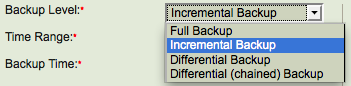
Log incremental type is the default and is available for all backup methods. The incremental backup will contain all binary logs since the last full backup or last incremental backup. This backup type requires Binary logs to be enabled on the MySQL server.
Differential incremental type is available only for MySQL Enterprise Backup. This backup contains all block level changes since last full backup. Using this backup incremental type when compared to Chained Differential incremental type, makes the restoration easier but the backup size becomes larger for every successive Differential backup.
Chained Differential incremental type is available only for MySQL Enterprise Backup. This backup contains all block level changes since last differential backup or full backup.
Time Range
The values can be Daily, Weekly, Monthly. Weekly backup allows you select the list of specific days and Monthly backup allows you select the list of specific dates in a month. Hourly backups can be scheduled by selecting Daily backup and specifying various backup times.
Backup Time
Specific time of the day (24 hour clock) when the backup run starts. The local time zone of the ZRM server is used.