
Table of contents
- 1. Backup How
- 1.1. Backup Method
- 1.1.1. Logical backup method
- 1.1.2. Raw Backup Method/without snapshots
- 1.1.3. MySQL Enterprise Backup
- 1.1.4. XtraBackup
- 1.2. Backup Alerts/Logging
- 1.3. Compression/Encryption
- 1.4. Remote Backups
- 1.5.
- 1.6. Pre-/Post- Backup
- 1.1. Backup Method
Backup How
The Backup how page lets you specify the backup method along with other options that let you optimize the type of backup given the performance required at your site.
All configuration parameters can be configured by selecting the links from the left panel - Backup Method, Backup Alerts/Logging, Compression/Encryption, Remote Backups and Pre/Post Backups. The Backup How page below shows the Backup Method selected and configured for Netapp Snapvault backup method.
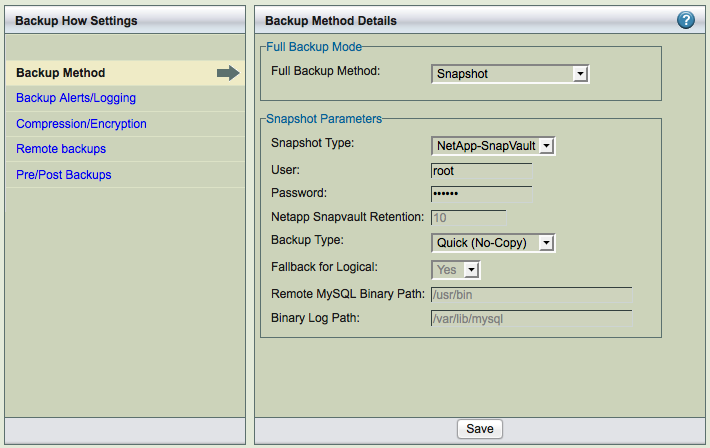
Most of the settings have default values, inherited from the Site Settings page or from factory defaults. Default strings are shown in the text field with a gray background. Radio buttons options (Yes, No, Default) show the current default value in parentheses to the right of the Default radio button (Y or N).
Backup Method
The backup method defines which method to use for full backups. ZRM supports different methods to perform full backups. Each backup set can have different full backup method. Each full backup method is described in a separate section. Snapshot backup method is described in the next chapter.
Logical backup method
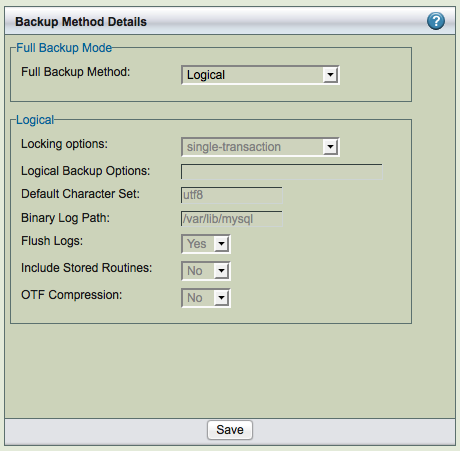
Following screenshot shows the logical full backup method. The databases/tables in the backup set are locked for updates during the backup process. The backup image contains SQL statements that can be changed if needed.
Choosing this option forces a mysqldump backup that copies MySQL binary logs regardless of the storage engine. MySQL binary logs track and save all database server transactions as a list of SQL statements. To implement a logical backup strategy, binary logging must be enabled on the MySQL server, and a path to the log files must be supplied (the default is /var/lib/mysql) in the Binary Log Path field
Logical backup method works with all MySQL storage engines except the MySQL cluster NDB storage engine. Logical backups can also be restored to any platform architecture or database that supports SQL. For example: Backups of MySQL database running on Redhat Enterprise server powerpc platform can be restored to Ubuntu server running on x86 platform.
Because logical backups require a read lock on the database(s) or tables being backed up, they can have a greater impact on the applications using the MySQL database. Logical backups also result in increased restore times, as restoring the data is accomplished by re-playing the transactions against the target database instead of just copying files.
Locking Options
When the backup set contains MyISAM tables, the lock-tables option should be selected. When the backup set contains InnoDB tables, the single-transaction option should be selected. Logical backup of mixture of InnoDB tables and MyISAM tables in the same backup set should be avoided.
Logical Backup Options
Parameters to the mysqldump MySQL command. Logical backup uses mysqldump command. You can customize the options using this field. For example: "--max_allowed_packet=1G" can be specified as value. These parameters are used in addition to parameters passed by ZRM.
Default Character Set
Specify the default character set that is used in the MySQL database. The default value is utf8; if the database uses a different character set, reset accordingly.
Binary Log Path
Enter the full path where the MySQL binary logs are stored once binary logging has been enabled. If nothing is entered here, the site default path is used.
Flush Logs
If you are backing up cloud database services (or when you do not have control over database server configuration) such as Amazon Relational Database services, you should set this parameter to No. Cloud database services does not allow end users to perform MySQL server operations.
Include Stored Routines
To improve the performance of database functions and procedures, MySQL versions 5.0 and higher allow users to compile and store them as reusable routines (Stored routines). This option specifies whether stored routines should be include during logical backups. The default value is No. If your version of MySQL supports this feature, it should probably be set to Yes. Setting the value to Default implies Site specific value is used for this parameter.
On-The-Fly (OTF) Compression
Specify whether backup image files stored on disk should be compressed as the backup progresses. The default is to start compression only after all backup files have been saved to disk. Turning this option on can save disk space, but results in slower backups.
Raw Backup Method/without snapshots
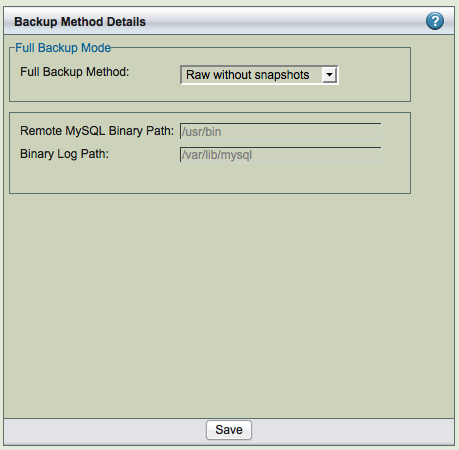
A raw backup makes a copy of the binary disk image of databases stored on non-transactional storage engines by using mysqlhotcopy. Although raw backups can be restored more quickly than logical backups, they can only be restored to same version of MySQL server on the same platform architecture. If any of the databases or tables are stored on a transactional storage engine (such as InnoDB), a logical mysqldump backup is taken instead unless snapshot backup method is configured.
Fallback for Logical
If this field is set to yes and snapshot backup fails, the logical backup is attempted. Set the value to No if you do not want to do logical backup if there is a snapshot backup failure.
Remote MySQL Binary Path
Path to the MySQL commands on the MySQL server.
Binary Log Path
Enter the full path where the MySQL binary logs are stored once binary logging has been enabled. If nothing is entered here, the site default path is used.
MySQL Enterprise Backup
MySQL Enterprise Backup (MEB) tool available from Oracle (requires license from Oracle) can be used as the backup method for the backup set. Full, Differential and Chained differential backups can be performed using this tool.
Select MySQL Enterprise Backup as the full backup method to use Oracle's InnoDB Hot Backup or MySQL Enterprise Backup to perform the backup. Oracle's InnoDB Hot Backup must be purchased from www.innodb.com or use MySQL Enterprise Server Standard edition or higher. This option provides integration between ZRM and the Oracle product.
MySQL Enterprise Backup requires the innodb_data_home_dir to be specified explicitly in the my.cnf for the MySQL server being backed up. The directory cannot be specified as part of innodb_data_file_path. For example:
- innodb_data_home_dir = /innodb/innodbdata/
innodb_data_file_path=ibdata1:50M;ibda2:50M;ibda3:40M;ibd4:20M:autoextend
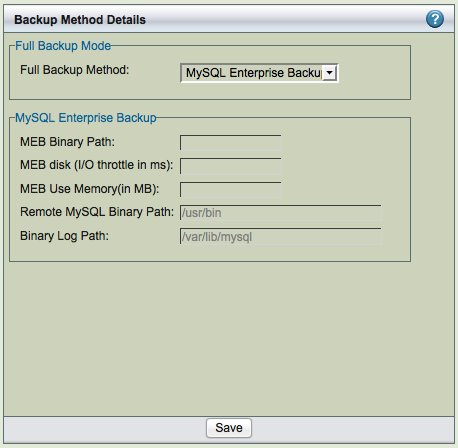
- Following image shows the full backup method configured as MySQL Enterprise Backup:
MEB Binary Path
Path to the InnoDB Hot Backup tools: the ibbackup binary and the mysqlbackup tool, which must be installed in the same path on the MySQL server being backed up and ZRM server. The default path is /usr/bin. The mysql user should have permissions to execute the mysqlbackup tool.
MEB disk (I/O throttle)
MEB disk throttle can be specified to throttle disk I/O during backup. It is specified in milliseconds, the backup sleeps for that time between disk I/O.
MEB Use Memory (in MB)
Amount of memory on the MySQL server that can be used MySQL Enterprise Backup. The default is to use as much as memory as available. If you reduce the memory available for MEB significantly, the backup performance will have significant impact.
Remote MySQL Binary Path
Path to the MySQL commands on the MySQL server.
Binary Log Path
Enter the full path where the MySQL binary logs are stored once binary logging has been enabled. If nothing is entered here, the site default path is used.
XtraBackup
Select XtraBackup as the backup method to Xtrabackup tool to perform the backup. Xtrabackup tool can be downloaded from Percona or SkySQL. It is open source and can be downloaded to MySQL server. This option provides integration between ZRM and Xtrabackup. This allows backup to proceed without setting any locks or impacting database operation.
Full, differential and chained differential backups are performed using this tool. This tool also users to restore a table from a database backup. Restores of table can be performed only to Percona MySQL servers.
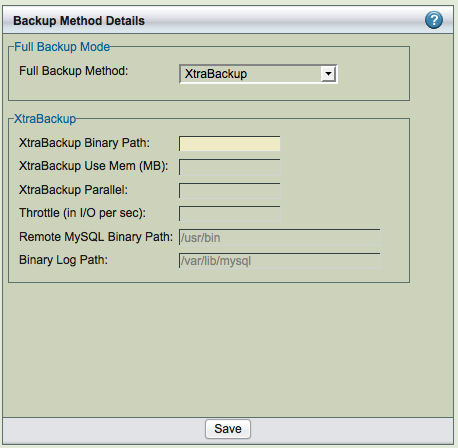
XtraBackup Binary Path
You must then supply the path to the Xtrabackup tools: the xtrabackup binary and the innobackupex tool, which must be installed in the same path on the MySQL server being backed up. The default path is /usr/bin. The mysql user should have permissions to execute the innobackupex tool.
XtraBackup Use Memory (in MB)
Amount of memory used by Xtrabackup tool. The default is 100MB.
XtraBackup Parallel
Specifies the number of threads created by xtrabackup to copy data files. This option is useful when multiple tablespaces option is enabled (innodb_file_per_table MySQL server option) or the shared tablespace must be stored in multiplhttp://www.percona.com/doc/percona-xtrabackup/glossary.html#term-ibdatae ibdata files with the innodb_data_file_path MySQL server option. The default is 1.
Throttle (in I/O per second)
Xtrabackup backups can be throttled by specifying the number of disk I/Os performed by the backup tool in a second.
Remote MySQL Binary Path
Path to the MySQL commands on the MySQL server.
Binary Log Path
Enter the full path where the MySQL binary logs are stored once binary logging has been enabled. If nothing is entered here, the site default path is used.
- Email Address (or Update Windows Event Log on Windows servers)
Backup Alerts/Logging
Select Backup Alerts/Logging to send email notifications and control log verbosity.
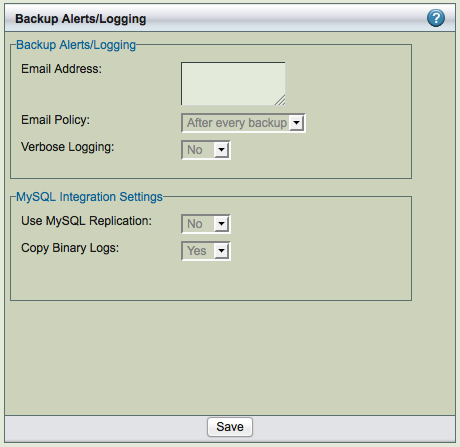
- On Linux/Solaris servers, enter the email address of the ZMC backup administrator. All backup run notifications and summary reports will be automatically sent to the email address based on the email policy. A mail user agent (MUA) such as Mailx must be manually configured on the MySQL server before any email can be sent. To email reports and notifications to more than one user, set up a group email alias on your mail server and enter group email alias here. Alternatively, you can enter multiple email addresses separated by space. For example: [email protected] [email protected]
- On Windows ZRM servers, select whether to use the Windows Event Log to save and display notifications and summary reports. Note that even when logging successful ZRM operations, the Windows Event Log will show the following error.

- The "Event description not found" messages can be safely ignored.
- Email Policy
- This policy determines when email should be sent to the configured Email Address. Policy can be After every backup (the default value), Never (no notification is performed) or Backup with error (when there are failures in the backup run).
Verbose Logging
Verbose logging should turned on or off. Zmanda Support Team will ask you turn on verbose logging for backup sets to troubleshoot problems in a backup set.
- MySQL Replication
- Specifies whether ZRM for MySQL will use the MySQL Replication facility that has been enabled on the MySQL server that is to be backed up. Backing up a replication slave reduces impact on the production database near zero while backups are in progress. When this option is enabled and the mMySQL server is a replication slave, ZRM for MySQL will back up the master.info, relay-log.info and any SQL_LOAD-* files if they exist. For further details on the benefits of using a replication slave for backup, see this MySQL documentation. The master.info and relay-log.info files are described here. If you are backing up replication slave, you need to enable log-slave-updates in the replication slave in MySQL configuration file (my.cnf) for log incremental backups.
- Copy Binary Logs
- By default, ZRM copies binary logs during full backups (Default value is Yes). This allows ZRM to restore to any event between last backup before full backup and the full backup. You can turn this behavior off by setting value to No.
Compression/Encryption
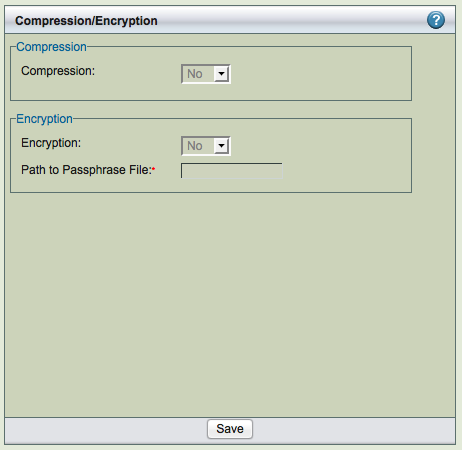
Backup can be compressed and encrypted. ZRM compression and encryption is performed on the ZRM server.
- Compression
- Backup compression is performed on the ZRM server. Allows you to compress the image using gzip on the ZRM server. If the storage engine already compresses data (such as ARCHIVE storage engine), there is no value in setting this to Yes.
- Encryption
- Backup encryption is performed on the ZRM server. Default encryption is performed using GPG. ZRM server should have GPG (GNU Privacy Guard) packages installed. These packages are part of Linux and Solaris distribution. The default encryption algorithm used is AES 256. If different key length or cryptographic algorithm is required, please modify gpg parameters in the script /usr/share/mysql-zrm/plugins/encrypt-plugin.pl on the ZRM server. Please contact Zmanda support team for help.
- Path to passphrase file
The full path to the encryption passphrase file. The encryption file is usually stored as /etc/mysql-zrm/<backup set name>/.passphrase on the ZRM server. The passphrase should be owned by mysql user and should have 400 permission. It is very important to protect the contents of the passphrase file. Passphrase file contains the sequence of words or a string that is used for encryption. It is important to choose a good passphrase. The longer and more random the passphrase, the more difficult to crack the encryption. The passphrase file should contain the passphrase in the first line (other lines in the file are not read). A method to generate passphrase is to use the following command:
$ gpg --gen-random 1 16 | gpg --enarmor | sed -n 5p > /etc/mysql-zrm/<backup set name>/.passphrase
Backup Encryption Caution: It is very important to store the encrypt-plugin.pl and the passphrase file used for the backup set. These files are necessary
for restoration. Without these files, it is impossible to restore the backup image and backup image is no longer useful.
Remote Backups
- The copy plugin is used to transfer backup files to and from a remote MySQL server to the ZRM server. Use this option in the following circumstances:
-
-
- backing up any Windows-based MySQL server; use the Windows copy plugin.
- remote incremental backup is required
- copying replication-related files from a remote machine
- executing mysqlhotcopy (MySQL command) to copy the data from the remote MySQL server
- executing mysqlhotcopy to restore the data to a remote MySQL server.
- backing up remote machines via snapshot backups.
- For non-Windows remote MySQL servers, choose SSH or Socket, and then enter the appropriate parameters for the option selected. Available copy plugins are described below:
- SSH
- Secure Shell-based communication. Use when a higher level of security is required (such as when the client and server communicate across a firewall). You must then enter the SSH username on the remote MySQL server, and the path where MySQL commands are installed on the remote machine. For backup, it is necessary to set up password-less ssh configuration is required (i.e, mysql user on ZRM server should be able to ssh to MySQL server without being prompted for password). During restore, users will prompted for ssh password if needed. The user id and group id of mysql user must be same on the ZRM and MySQL server.
- Socket
- Socket-based communication. This is the default copy plugin. This requires that the ZRM client components are installed on the remote machine, as described in the Installation Instructions. You must then enter a port for the remote socket (the factory default is 25300. The path where MySQL commands are installed on the remote machine must be provided. The user id and group id of mysql user must be same on the ZRM and MySQL server.
- Windows
- The Windows copy plugin is required for backing up any Windows-based MySQL server. It requires the ZRM for MySQL Windows client components described in the Installation Instructions. You must then enter the communications ports to use during backup (default is 10080) and restore (default is 10081) operations
- Windows
Pre-/Post- Backup
Choose Custom to activate the feature (unless you have set a site setting; the factory setting is to use no pre-backup plugin), then specify the full path and any command-line options to the script or utility you want executed before the backup run starts. This feature can be used to check and prepare the MySQL server environment for backup. For example, you could use it to notify all MySQL database users that a backup is about to begin.
ZRM for MySQL does not check if the path is a valid path, nor if the plugin is present at the given location. The recommended location for plugins is /usr/share/mysql-zrm/plugins directory. A template file (pre-backup.pl) is installed in this location; use the template when writing your own pre-backup plugin. All pre-backup plugin scripts must accept the following command-line parameters (which are passed to the plugin using the Plugin Option(s) field:
- --all-databases
- Use when all databases in the MySQL server are being backed up.
- --database database1 database2...
- Use when selected databases are being backed up.
- --database database1 database2...
- --database database --tables table1 table2 ...
Use to specify the list of tables in the database that are being backed up.
The script should be written to return a non-zero value on error; pre-backup plugin failures should cancel the backup and generate a failure message for reports and logs.
- Post-backup
- Choose Custom to activate the feature (unless you have set a site setting; the factory setting is to use no post-backup plugin), then specify the full path and any command-line options to the script or utility you want executed after the backup run is completed. A template file (post-backup.pl) is installed in this location; use the template when writing your own pre-backup plugin. In addition the parameters for the pre-backup plugin described above, the post-backup plugin should be written to accept the following additional options:
- --backup-directory path
The post-backup plugin is executed twice: before the checksum is performed, and after the checksum is complete. See the man page for mysql-zrm-backup(1) for more details on how the post-backup plugin operates and the flags it returns.
Note that although failures of the post-backup plugin are logged, they are not included in backup reports if the backup itself succeeded.
- Snapshot
- Select a snapshot plugin if desired. Snapshot plugins are described in more detail in the Snapshot Plugins section of this manual.
- Backup Type
- This field appears only when Snapshot plugins are used. The values are shown below:
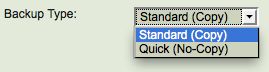
Standard (Copy)
Full and Incremental backups are copied to the ZRM server to the destination location specified in the Backup Where page.
Quick (No-Copy)
Full backups are maintained as snapshots. Full backup are not copied to the ZRM server. This backup is faster but full backup will not available if the storage system fails. So, it is important to convert quick backups to regular backups. Incremental backups are copied over to ZRM server.