
Table of contents
- 1. Introduction
- 2. Procedure
- 3. Example
- 4. Success
Introduction
- All the Verify pages are structured in a similar fashion to each other.
- Verify Client page has just one addition compared to other Verify pages.
- It has an additional drop down box (labeled No 1 below) that allows the user to verify:
- All the Client Hosts that has been specified on the Backup What page.
- This is option is at the bottom of the drop down list.
- A single Client Host from the drop down list.
- If users want to test two or more Client Hosts, the user will have to chose them one after the other and conduct separate tests for each of them.
- All the Client Hosts that has been specified on the Backup What page.
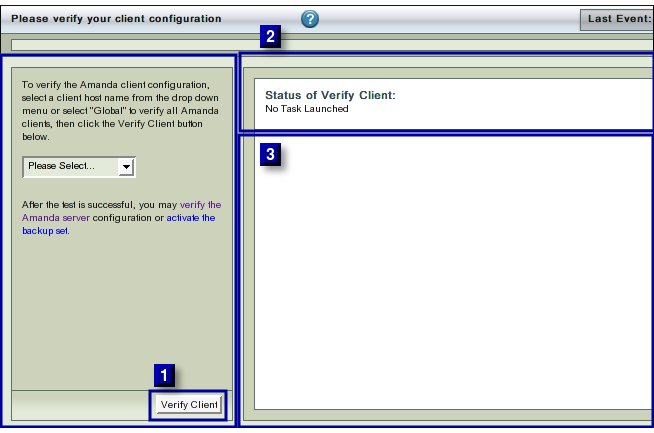
- It is recommended to run the Client Verification after any change to the Backup What list.
Procedure
- Select either 'All' clients or any one of them to Verify from drop down box No 1.
- Click the Verify Client Button (No 2 above) when ready to proceed.
- The text in upper right hand rectangle (No 3 above) will change to indicate that the Client Verification process has started.
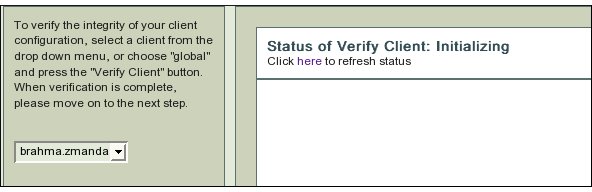
- Further Progress messages/ error messages will appear in area No 4 .
- ZMC's checks on a Client Host can give rise to a wide variety of error messages!
Example
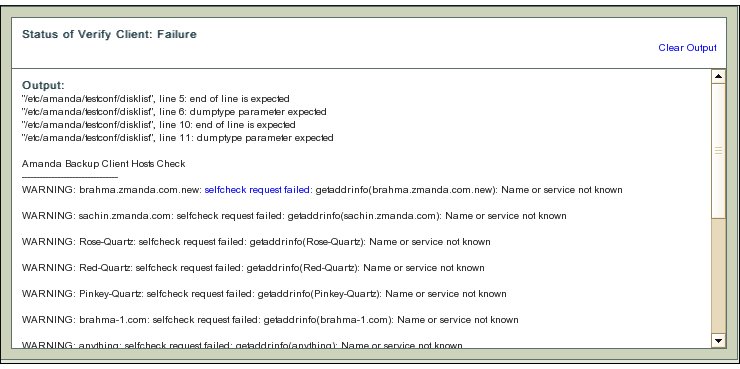
- The error messages are verbose to help users to determine what caused the error.
- Here the Host name specified in the Backup What page (though valid in terms of formatting rules) does not correspond to any entry in the Domain Name Server.
- Hence DNS cannot provide any IP address for the next step of checking to begin.
- Go back to the BackupWhat page and correct the entry so that it corresponds to a DNS name.
- Come back to this page and verify the Amanda client without having to go through the previous successful checks.
- Verification messages have hyperlinks (disklist in this example). Clicking on the hyperlink will provide additional information about the message from Zmanda Network Knowledgebase or the Amanda wiki.
- A ZMC administrator must have root access on the ZMC server and all the client hosts that it is expected to backup.
- The client software must be installed on each client separately.
- If these tasks have not been carried out, Verify client will give users verbose error messages when verifying the client.
Success
- Success has the following message:
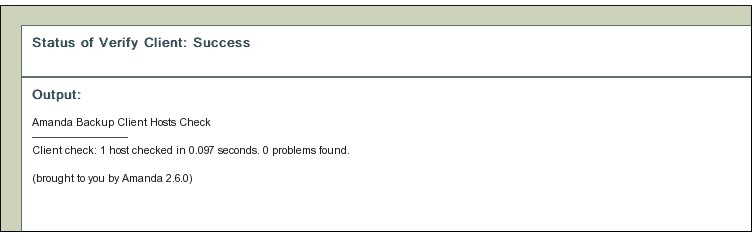
- Please successfully verify all the clients before activating the backup set.