
Table of contents
Zmanda Cloud Backup 3.0.2 Service Pack 1 adds support for Amazon Asia Pacific (Tokyo) location. This cloud storage location is recommended cloud backup location for customers in Japan.
Installation procedure
- Zmanda Cloud Backup 3.0.2 software should be installed.
- Download the Service Pack 1 from Zmanda Network. Service Pack 1 is a Java jar file and is named ZCB.jar
- Close the Zmanda Cloud Backup user interface.
- Save a copy of C:\Program Files\Zmanda\Zmanda Cloud Backup\bin\ZCB.jar as C:\Program Files\Zmanda\Zmanda Cloud Backup\bin\ZCB.jar.3.0.2
- Copy the Service Pack 1 ZCB.jar file to C:\Program Files\Zmanda\Zmanda Cloud Backup\bin folder.
- Restart the Zmanda Cloud Backup User Interface.
Note: The above procedure assumes default installation location. If you have installed Zmanda Cloud Backup in a different location, please copy ZCB.jar to the appropriate sub-folder under the installation folder.
Configuring Tokyo Cloud Location
- After installation of Service Pack 1, start the Zmanda Cloud Backup User Interface.
- Create a new backup set and set the Cloud Location in Backup Where tab as shown below.
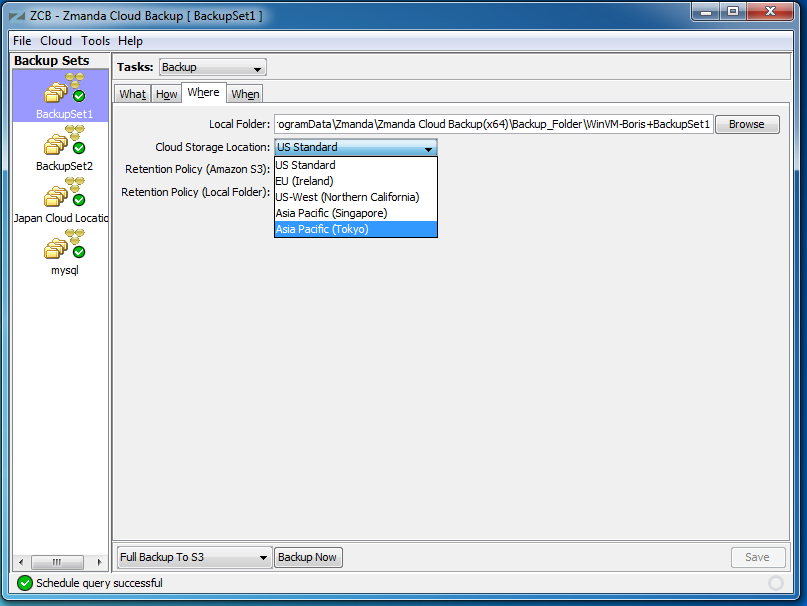
- You can perform backup and recovery operations on the new backup set.
Note: Changing Cloud Storage Location for existing backup sets might result in old backup images for the backup set not available for restoration.